
Code to try first
Copy code
Enter it in the checkout discount field, then confirm the reduced order total before payment.
The Recorded Checkout Result
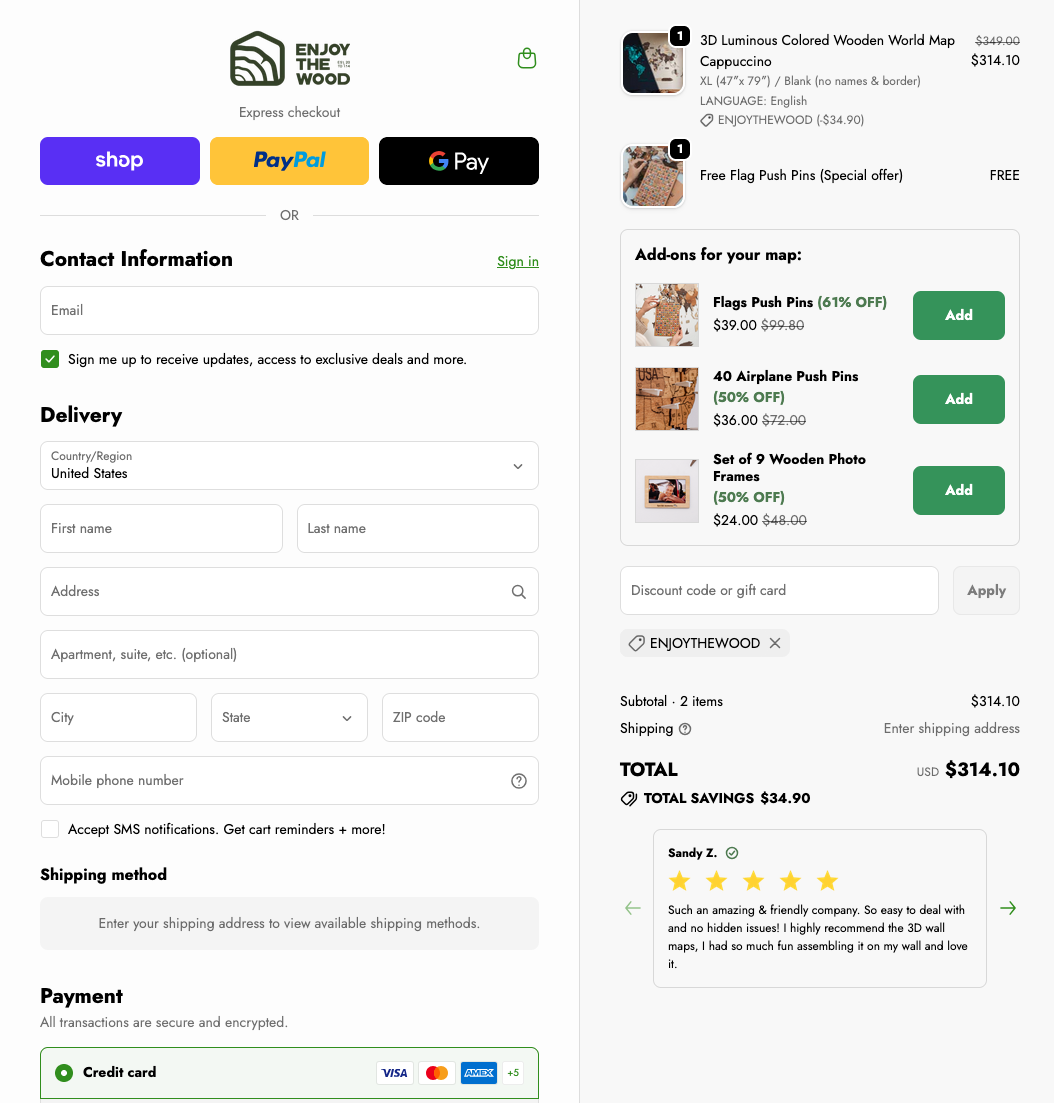
The screenshot below was recorded in . It shows a 3D Luminous Colored Wooden World Map Cappuccino, XL (47 x 79 in), Blank, English, with United States selected as the destination.
- Map before code
- $349.00
- Code discount
- $34.90
- Map after code
- $314.10
Shipping had not been calculated because no delivery address was entered. This example documents one historical cart; the current price, code eligibility and gift promotions can differ.
Do not start by chasing the biggest advertised percentage. Start by building the exact cart you want, then test the code on that cart. Coupon results can vary by product, active sale, bundle, or checkout rule.
Step-by-Step: How to Apply the Code
Choose the exact product first
Pick the map style, size, finish, and accessories before thinking about the discount. A code only helps if the item itself is the right fit.
Add the item to cart
Use the official Enjoy The Wood store and add the product you actually plan to buy. Do not compare discounts on a placeholder item.
Go to checkout
In our saved checkout, the order summary contains a field labeled Discount code or gift card, with an Apply button. Look for this field before completing payment; the current layout may differ.
Enter ENJOYTHEWOOD
Type the code in all caps with no spaces before or after it, then apply it and wait for the order total to update.
Confirm the final total
Check that the discount appears in the checkout summary. The final total matters more than the advertised percentage on any coupon page.
Important
The Discount Is Only Real When the Checkout Total Changes
Search results and coupon sites can show old, exaggerated, or product-specific offers. Treat them as leads, not proof. The proof is the final checkout summary on the official store before payment.
For the current code status, start with our Enjoy The Wood coupon code page, then test the code in your own cart.
Common Mistakes When Applying the Code
Most failed attempts are not mysterious. They usually come from a small copy-paste issue, an automatic promotion already in the cart, or expecting two offers to stack.
Missing the combined code field
Our screenshot shows one field labeled Discount code or gift card. Enter the coupon there, click Apply, and check for the code and a discount amount in the summary.
Leaving an extra space
Copied codes can include invisible spaces. If the code fails, delete it and type it manually.
Trying to stack multiple offers
Many checkouts allow only one code or one active promotion per order. Compare the final order total after each attempt.
Judging by the cart too early
Some stores update discounts at checkout rather than on the cart page. Continue to the payment step, but do not pay until the discount is visible.
Does It Work for US Buyers and Other Countries?
Yes, the code is entered through the same checkout discount field. Enjoy The Wood has country and currency options on the official site, including the United States, Germany, Spain, Canada, the United Kingdom, Australia, and many other destinations.
The important country-specific checks are not the code field itself. They are the final currency, shipping estimate, delivery window, taxes or duties where applicable, and return terms for your address.
What to Check Before You Pay
| Code | ENJOYTHEWOOD is typed exactly, with no extra spaces |
|---|---|
| Discount | The order summary shows a reduced total |
| Product | The size, finish, and map style are the ones you actually want |
| Shipping | The delivery estimate works for your timeline |
| Gift timing | There is enough room for production, shipping, and possible delay |
If the Code Does Not Apply
If the code fails, do not keep refreshing the same cart forever. Retype the code, try one promotion at a time, and check whether the item is already discounted. If it still does not apply, use our troubleshooting guide:
That article covers expired codes, cart restrictions, browser sessions, sale-item rules, and when to contact Enjoy The Wood support.
Buying During a Sale or Ordering a Gift
We do not have a recorded price history that establishes a cheapest month, Black Friday price or guaranteed future discount. If your purchase date is flexible, compare the same map configuration across the offers you can actually use. Keep the size, finish, detail option and accessories the same, then compare the final total including delivery and any charges shown for your destination.
For a gift, start with the recipient's wall and delivery deadline. Our own XL 3D Luminous Colored Wooden World Map took 4-5 hours to install; identifying the small islands was the slowest part. Leave time for setup after delivery if the gift is meant to be a finished wall display. Read the owner review with original XL map photos to judge the product and the installation notes for the work involved.
- Buying for your own room: measure the available wall and confirm the dimensions of the selected map before comparing prices.
- A gift with a deadline: check the store's current delivery estimate for the recipient's address and consider what happens if it arrives late.
- A surprise gift: confirm there is space for the map and check the return terms for that configuration, particularly personalized items.
- Waiting for a sale: keep a record of the dated cart total so the next offer can be compared with the same product and delivery destination.
Ready to test the code?
Open the official store, build the exact cart you want, enter the code, and confirm the final discount before paying.
Frequently Asked Questions
Where do I enter an Enjoy The Wood discount code?
Our saved checkout shows a field labeled Discount code or gift card in the order summary. Enter the code, click Apply, and confirm that a discount amount appears before payment. The current checkout layout may differ.
What Enjoy The Wood discount code should I use?
Start with ENJOYTHEWOOD, then confirm that the discount appears in the checkout summary. For the latest verification notes, use our main Enjoy The Wood coupon page.
Does the Enjoy The Wood discount code work outside the US?
The same checkout discount field is used regardless of country. Enjoy The Wood offers country and currency options on its official site, so buyers outside the US should still test the code at checkout and confirm the final total before paying.
Can I use an Enjoy The Wood coupon code on sale items?
It depends on the current checkout rules. Some sale, bundle, or special promotion items may not stack with another code. Always test the code and compare the final total before payment.
What should I do if the code does not work?
Retype the code, remove extra spaces, try one code at a time, and check whether another automatic promotion is already active. If it still fails, read our Enjoy The Wood coupon code not working guide.
Should I wait for an Enjoy The Wood sale?
We do not have a price history that identifies the cheapest sale period. Compare the same model, size and accessories at the final checkout total. For a gift, check delivery to the recipient's address and allow time for installation; our XL Luminous map took 4-5 hours to install.
Related Guides
Enjoy The Wood Coupon Code
Recorded checkout evidence and coupon conditions
Coupon Code Not Working?
Troubleshooting failed code attempts
Enjoy The Wood Installation Guide
Real XL setup time, wall prep, and island tips
Our XL Luminous Map Review
Original owner photos, installation experience and buying tradeoffs
Enjoy The Wood Size Guide
Measure before choosing a map size